Gaming Chair or Ergonomic Office Chair: Which Suits Long Work and Study Hours?
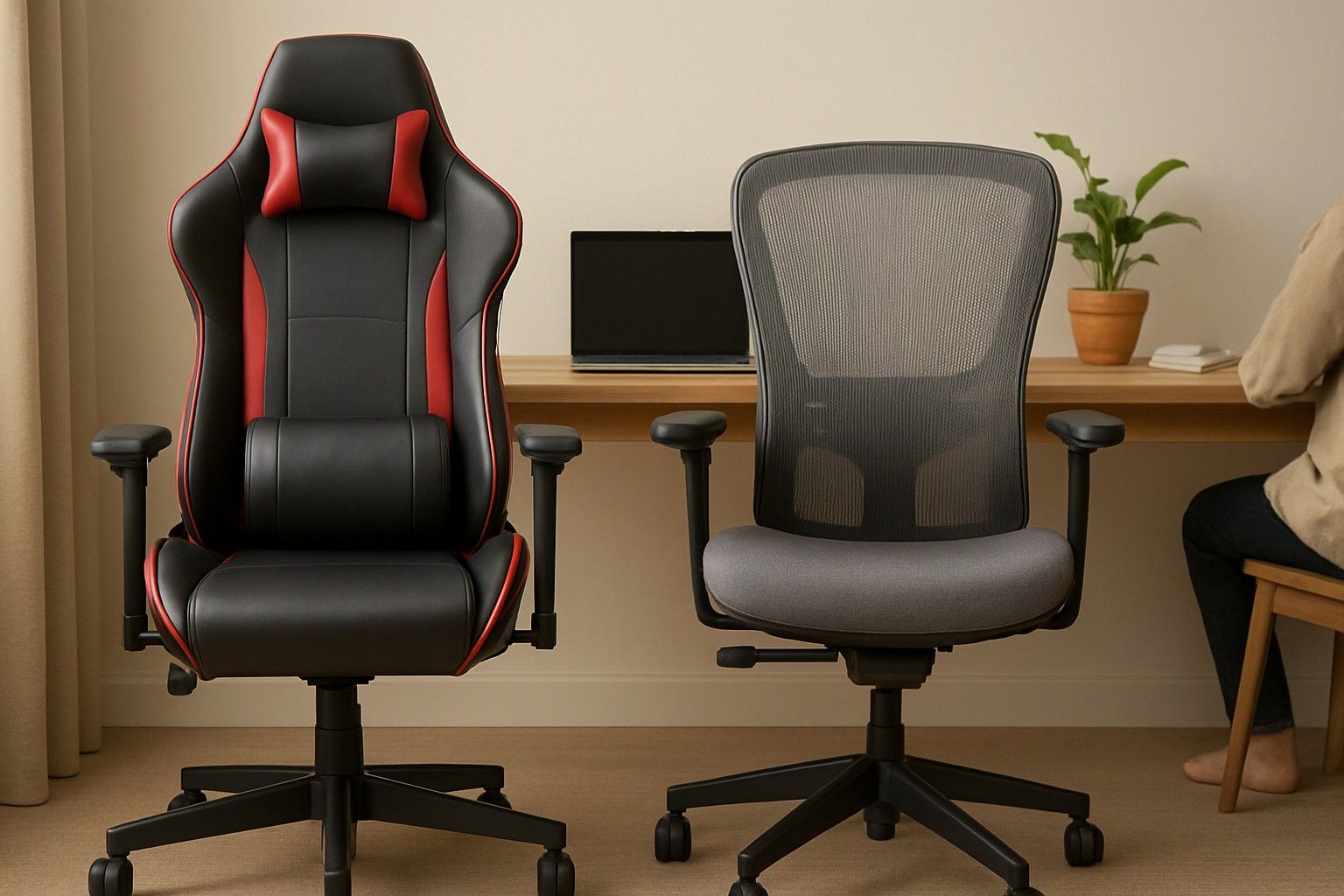
If you sit 8 to 10 hours a day for work-from-home shifts or exam preparation, this comparison is for you. A gaming chair and an ergonomic office chair look like rivals, but they are built around different priorities: one for a reclined, immersive posture and style, the other for staying upright and supported through a full working day. Here is how they differ on back support, heat and money, so you can decide today.
How the Two Designs Differ: Bucket Seats vs Contoured Mesh Backs
Most gaming chair brands borrows design from racing seats. It has a tall back, side bolsters that curve around your torso, a high-wall seat and usually a padded headrest. The shape holds you in one position, which feels snug for a couple of hours of play. Over a full workday it can become restrictive, because the bolsters limit how freely you shift, and shifting is how most people avoid stiffness.
An ergonomic office chair is designed around the spine and the thighs. The backrest is usually contoured and often made of mesh, the seat edge is gently rounded so it does not press behind the knees, and the shape is flatter and more open. It does not hold you in place. It follows you as you move.
The practical difference is intent. A gaming chair is shaped to look and feel immersive. An office chair is shaped to make sitting upright for long stretches less tiring. For 8 to 10 hours daily, that difference matters more than appearance, especially if your desk work involves typing or reading rather than leaning back with a controller.
Lower-Back Support: Strap-On Pillows vs Built-In Lumbar Mechanisms
Most gaming chairs handle lower-back support with a separate lumbar pillow, often attached with an elastic strap. It can help, but it sits where the strap puts it, it can slide down as you move, and it cannot adapt to the curve of your spine. If the pillow does not match your height, it pushes you forward rather than supporting you.
Ergonomic office chairs usually build lumbar support into the backrest. Some have a fixed curve at the right height, while others let you move the support up or down or adjust its depth. This keeps the support in the same place through the day and lets you tune it to your torso length.
The rest of the chair determines whether that support stays useful. Seat height, seat depth, and armrests that move in several directions all affect your posture, and how 4D armrests and recline locks change daily comfort is worth understanding before you compare any two chairs. For long sittings, a chair with an adjustable lumbar mechanism and a lockable recline is the safer choice. A gaming chair with a good pillow can work, but you will need to set it up and check it regularly.
Heat and Sweat in Indian Rooms Without Constant AC
Many Indian homes do not run an air conditioner all day. In a room with only a fan, a chair that traps heat becomes uncomfortable within an hour or two. Gaming chairs are commonly upholstered in PU leather, which does not breathe well. The big bolsters also press against your back and sides, so less air reaches your body. In humid months that can mean sweat marks on the seat and a sticky backrest.
Mesh-backed ergonomic chairs let air move through the back, which keeps your body cooler. The seat may use mesh or foam with a fabric cover. The trade-off is that mesh feels firmer and less plush than padded leather, and some people miss the cushioned feel.
If your room is warm for most of the year, breathability should weigh heavily in your decision. Fabric-covered gaming chairs exist and sit between the two options, and why upholstery choice matters more in humid months explains how each material behaves over a long Indian summer. If you rely on AC, heat matters less, and comfort and fit can lead.
What the Same Budget Buys in Each Chair Type
Prices across this category run from ₹5,000 to ₹35,000, with an average around ₹8,000. How far your money goes depends on the chair type.
In the ₹6,500 bracket, expect basic builds in either style. Gaming chairs here often put styling first, with bold colours and a headrest pillow, while the mechanisms and padding are simple. Entry-level office chairs focus on a functional backrest but may offer few adjustments. In either type, check that the seat height lever and recline feel stable.
The ₹8,500 bracket is where the choice gets interesting. Gaming chairs in this range often add better foam, a more reliable tilt mechanism and adjustable armrests. Ergonomic chairs at this level commonly bring adjustable lumbar support, a breathable back and a smoother seat mechanism. For daily long-hours use, this bracket usually offers the most useful step up.
In the ₹20,000 bracket, you can get a well-built ergonomic chair with several adjustment points, or a gaming chair with sturdier hardware and more refined upholstery. Spend on adjustability and build rather than extra styling features. A higher price helps only if it pays for the mechanisms you will actually use.
Who Should Pick Which: Gamers, WFH Professionals and Exam Aspirants
Gamers who also work a few hours: A gaming chair is a reasonable fit if play sessions are your main use and desk work is occasional. The snug shape and recline suit relaxed, immersive sitting. Add a lumbar pillow that you position carefully, and take breaks.
WFH professionals sitting 8 to 10 hours: An ergonomic office chair is the stronger choice. You will be typing, attending calls and shifting posture through the day, so built-in lumbar support, adjustable armrests and a breathable back matter more than looks. If you prefer a gaming style, choose a model with proper lumbar adjustment, seat depth control and a stable recline lock rather than relying on a pillow.
Exam aspirants: Study hours are usually upright, with the body leaning toward a desk. A chair that supports an upright spine and has armrests that fit under the table suits this posture. Large side bolsters can get in the way when you lean over books, so an office chair is generally easier to live with. If your room is warm and you do not have AC, favour breathable materials.
If you split time between work, study and play, an ergonomic chair with a decent recline covers most needs better than a gaming chair does.
What to Evaluate Once You Have Picked a Chair Style
Once you know whether you are buying a gaming-style or office-style chair, the next step is checking the specifics that decide whether it will last through daily use. Look at seat height range against your desk and your leg length, the depth of the seat, the stability of the recline lock, how smoothly the armrests move and whether the base feels solid when you shift your weight.
Check the upholstery against your room's climate and the foam against your sitting hours. A seat that feels soft in a showroom can flatten and feel unsupportive after months of 8 to 10 hours of use. Also confirm what the warranty covers and how simple it is to get help with parts like gas lifts.
A full checklist is covered in the checks that matter after settling on a chair style. Use it to compare shortlisted chairs in your chosen bracket, and decide at today's prices on the one that fits your body and your room rather than on the styling alone.
For 8 to 10 hours of daily sitting, an ergonomic office chair with built-in lumbar support and a breathable back is the safer pick for most people. A gaming chair makes sense when play comes first and you are ready to set up its support carefully. Match the chair to how you actually sit, and the budget bracket you choose will go a long way.

Comments
Be the first to comment.