Power Cuts and Dead Batteries: How Smart Locks Keep You From Getting Locked Out
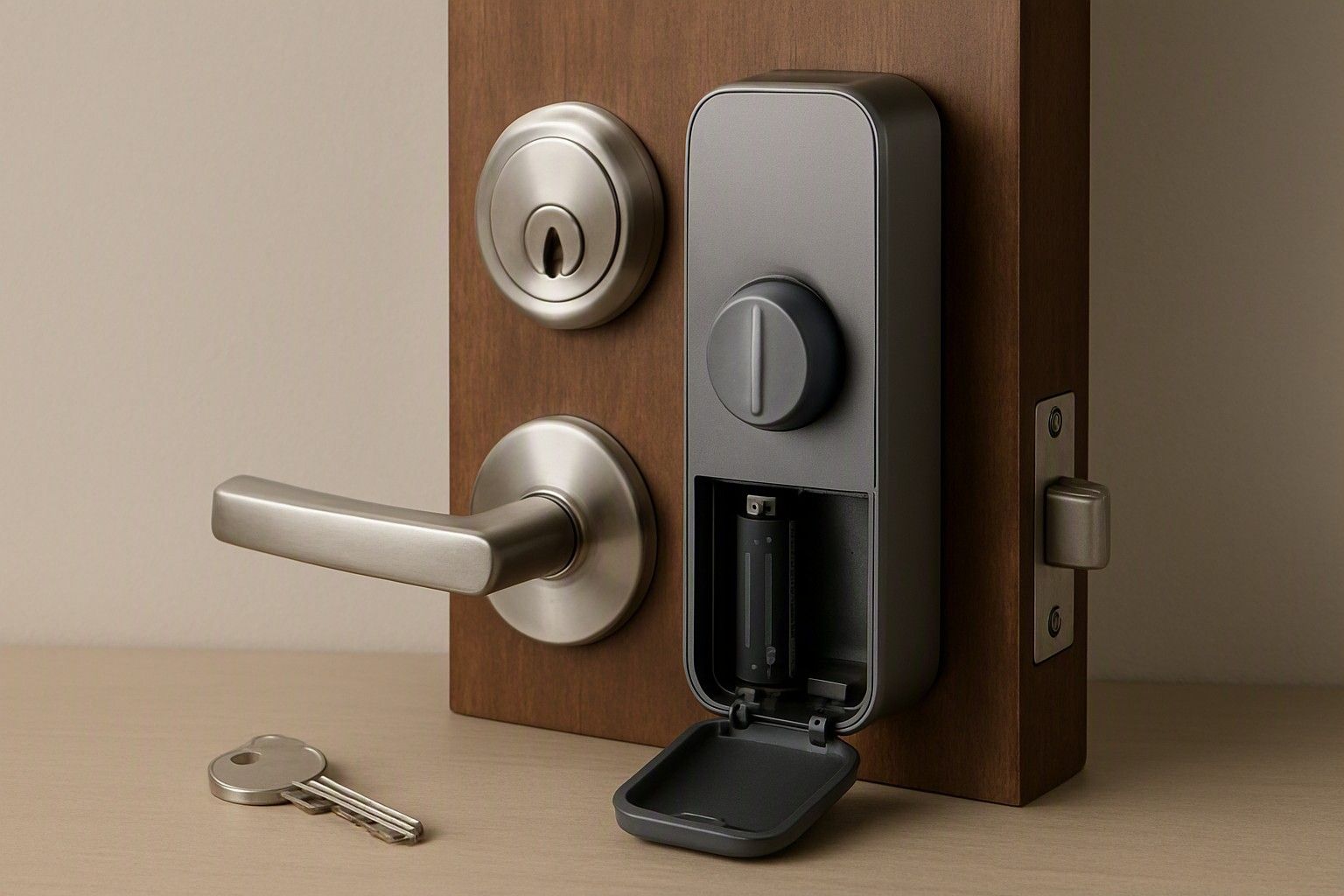
If you're weighing a smart lock against your current deadbolt, the real question isn't whether it looks good or connects to an app — it's what happens the night the power trips or the battery finally gives up. A well-designed smart lock is built with layers of backup precisely for this scenario, and understanding how those layers work is what separates a confident purchase from a nagging worry every time the lights flicker.
Do Smart Locks Run on Mains or Batteries?
Almost every smart lock sold for Indian homes runs on batteries, not mains electricity, and this is a deliberate design choice rather than a shortcoming. A lock wired into your house's electrical supply would fail exactly when you need it most — during the frequent, unpredictable outages that are a fact of life in most Indian cities and towns. By running on batteries, the lock stays completely independent of grid power, transformer trips, or inverter backup limits. This means a power cut in your building has zero effect on whether your door locks or unlocks.
Most locks use a set of standard AA or AAA alkaline batteries housed inside the interior panel, though some models at the higher end use rechargeable lithium packs. The motor that drives the bolt, the keypad or fingerprint sensor, the Wi-Fi or Bluetooth radio, and the small display all draw from this same battery pool. This is worth knowing because it explains why battery life becomes the real ownership concern with a smart lock, not electricity supply. You're not managing a mains dependency at all — you're managing a battery budget, and that budget is entirely predictable if you know what drains it and how to watch for warnings, which the next section covers in detail.
How Long Batteries Last and Low-Battery Warnings
Battery life on a typical smart lock ranges from several months to around a year of normal use, depending on how often the door is opened, whether Wi-Fi is kept active around the clock, and how many users are registered with fingerprint or face data that the sensor has to process on each attempt. Locks priced in the ₹4,000 range tend to use simpler sensors and radios that sip less power, while feature-heavy locks in the ₹10,000 and ₹18,000 bands often burn through battery faster because they're constantly listening for app connections, running larger displays, or processing biometric matches.
Every smart lock worth buying gives you advance warning before it actually dies. This typically shows up as a beep or flashing LED when the batteries hit roughly 20 percent, then repeats more insistently as the charge drops further, and finally an app notification if the lock is connected to Wi-Fi. Some models also announce battery status audibly every time you unlock the door once levels get low, which is a small but genuinely useful nudge that most owners don't ignore. The practical habit worth building is simple: the moment you hear or see the first low-battery signal, replace the batteries within the next few days rather than waiting for the second or third warning. Treat that first beep as a two-week deadline, not a countdown you can push to the edge, because the gap between first warning and total failure is shorter than people assume.
Emergency Power Options: USB and 9V Backup
This is the feature that actually answers the fear behind power-cut anxiety, and it's worth checking for specifically before you buy. Most mid-range and higher smart locks include an external terminal on the outside panel — usually a USB-C port or a pair of exposed metal contacts designed for a standard 9V battery. If your installed batteries die completely and you're standing outside with no way in, you touch a 9V battery to these contacts, or plug in a USB power bank, and the lock draws just enough current to power up, let you enter your code or use your fingerprint, and open the door normally. Nothing is reprogrammed or reset in this process; it's purely a temporary jump-start for the exact moment the internal batteries are exhausted.
This is precisely why keeping a spare 9V battery near your door, or in a bag you carry daily, matters more than it sounds like it should. It costs next to nothing and takes up no real space, but it's the difference between a five-minute inconvenience and being stuck outside your own home at night. Locks in the ₹4,000 tier sometimes skip this feature entirely to hit a lower price point, so if this concern is a priority for you, it's worth confirming the emergency power option is present before you commit to a lock at that budget, rather than assuming every smart lock includes it by default.
Mechanical Key Override as the Final Fail-Safe
Beneath every genuinely reliable smart lock sold in India sits a traditional mechanical cylinder, usually hidden under a small flap or panel on the outer face. This exists as the absolute last resort — if the batteries are dead, there's no 9V or USB backup handy, and the app isn't reachable, a physical key still opens the door the old-fashioned way, exactly like the lock it replaced. This isn't a compromise or a downgrade; it's a deliberate safety net that every trustworthy smart lock retains, because no electronic system should ever leave you with zero way back into your own home.
What varies significantly between models is how well this mechanical override is implemented — some locks use a cheap, easily-picked cylinder as an afterthought, while others use the same quality of cylinder you'd expect on a standalone mortise lock. Some models skip a physical key entirely and rely only on app or code-based backups, which removes this fail-safe altogether and is a meaningful trade-off to understand before buying. Because this single decision affects how stranded you can genuinely get in a worst-case scenario, this is why unlocking method choice matters so much when you're comparing locks rather than treating unlocking methods as a minor feature checkbox.
What Happens to App Locks When Wi-Fi Goes Down
A common misconception is that a smart lock stops working the moment your home Wi-Fi router loses power or your internet connection drops. In practice, the core locking mechanism is entirely independent of internet connectivity. Keypad codes, fingerprint matches, RFID cards, and the mechanical key all continue working exactly as before, because these functions are processed locally by the lock itself, not through a cloud server. Wi-Fi is only used for remote features — checking lock status from your phone while you're away, receiving activity notifications, or issuing a remote unlock command to let someone in when you're not home.
So if your router goes down during a power cut, or your ISP has an outage, you lose the ability to remotely monitor or unlock the door from outside your house, but anyone standing at the door with a valid code, fingerprint, or key still gets in without any trouble. This distinction matters a lot for how you think about reliability: the lock's daily, physical function never depends on your internet connection staying alive. The one exception worth knowing is locks that rely solely on an app-generated one-time code with no local keypad or biometric option at all — for those, a home network outage genuinely can block entry, which is another reason to prefer locks offering multiple independent unlocking methods rather than a single connected pathway.
Avoiding Lockout: A Practical Backup Plan
Getting locked out isn't really about smart lock reliability — it's almost always about a household not having a simple maintenance habit in place. A workable plan takes five minutes to set up and removes nearly all of the risk. Keep a spare set of fresh AA or AAA batteries stored inside a kitchen drawer near the door, not in some far corner of the house. Keep one 9V battery either taped near the lock's interior panel or in a bag you carry regularly, ready for emergency power. Note where the mechanical key override is and make sure every adult in the household knows a physical key exists and where it's kept, rather than assuming the app will always be the way in.
Beyond that, treat the first low-battery warning as an action item, not a background notification to dismiss. Prices for smart locks span from ₹2,500 to ₹28,000, with the average sitting around ₹9,000, and this spread reflects real differences in build quality, sensor type, and how robust the backup systems are — not just brand markup. A lock's current price against that historical range is a reasonable basis to decide now rather than a reason to wait, since the backup features discussed here are what actually protect you day to day, not the price tag itself. For the full set of factors beyond power and battery backup, return to the complete buying checklist before making your final call.
Power cuts and dead batteries are the two fears that stop a lot of Indian buyers from trusting a smart lock, but as this article lays out, both are accounted for by design — battery independence from mains power, layered warnings before failure, emergency USB or 9V backup, a mechanical key as the ultimate fail-safe, and local functions that don't depend on Wi-Fi. Put a small backup habit in place and getting locked out stops being a realistic worry at all.

Comments
Be the first to comment.